

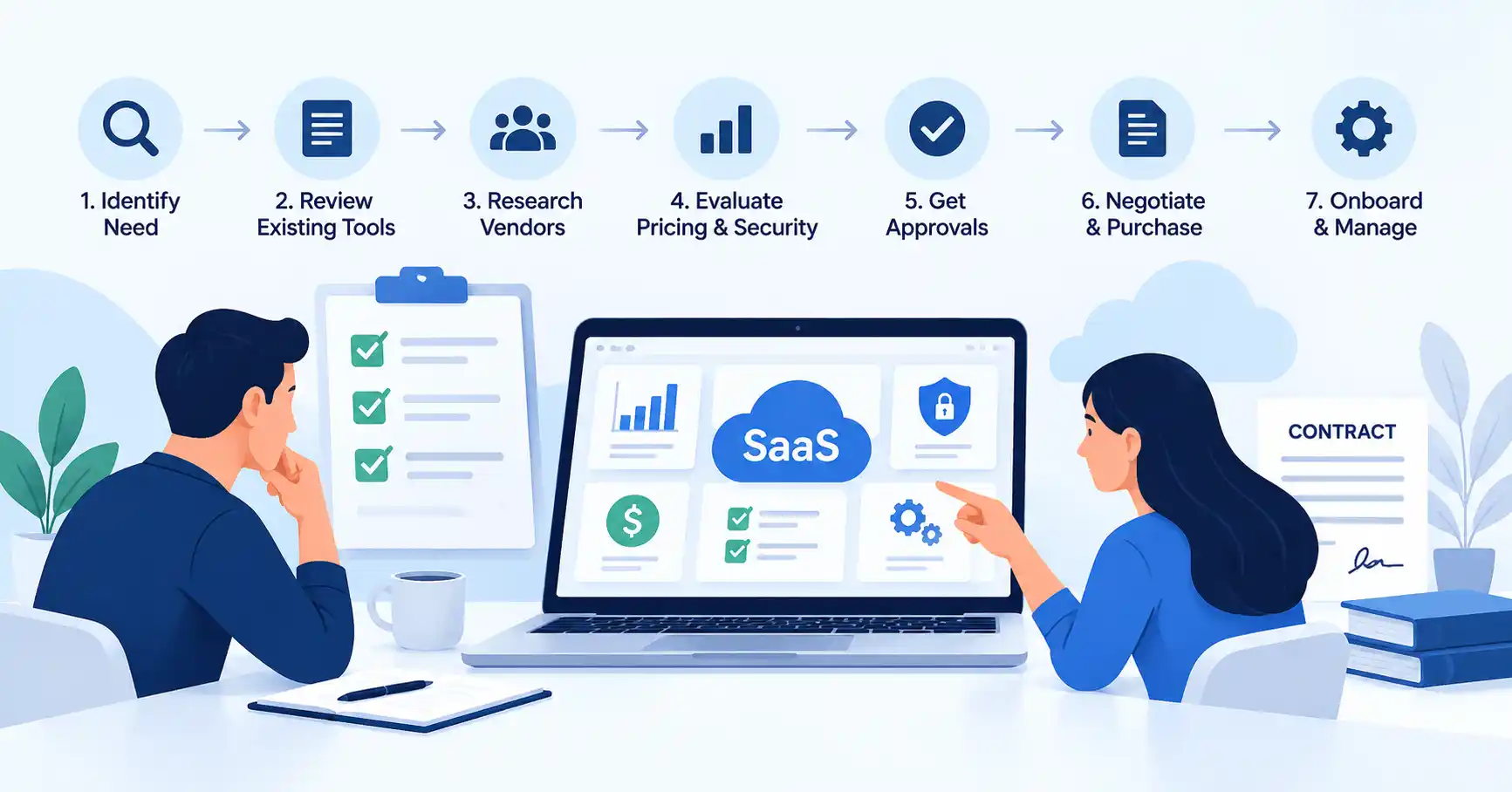
Choosing a SaaS tool involves more than comparing subscription prices. You need to know whether it addresses a genuine business need, works with your existing systems, keeps company data secure, and offers enough value to justify the ongoing expense.
A well defined SaaS procurement process helps teams answer these questions before committing to a subscription. It also makes it easier to avoid overlapping tools, unexpected costs, security issues, and contract renewals that catch everyone off guard.
This guide walks through the seven main steps of SaaS procurement, explains how to compare vendors, and shows you how to establish a practical purchasing workflow.
What Is the SaaS Procurement Process?
The SaaS procurement process covers everything a business does to identify, assess, approve, purchase, and manage subscription based software.
Unlike a one time software purchase, SaaS procurement continues after the initial transaction. Teams need to monitor subscription costs, user access, product usage, contract terms, and upcoming renewals.
SaaS procurement vs. SaaS purchasing: Purchasing is primarily about completing the transaction. Procurement takes a broader view, covering requirements, vendor research, risk assessment, approvals, contract negotiations, and ongoing management.
Depending on the company, founders, department managers, finance, IT, security, and legal teams may all have a role. Smaller businesses can combine several responsibilities, while larger organizations may need a more formal approval process.
The 7 Steps of the SaaS Procurement Process
Step 1: Define the Business Need
Before comparing products, get clear on the problem you want to solve. A popular tool or an attractive discount isn’t a good enough reason to add another subscription.
Document the business objective, essential features, expected users, required integrations, budget, and criteria for measuring success.
For example, a marketing team looking to automate email campaigns might need CRM integration, audience segmentation, campaign reporting, and compatibility with its existing contact database.
Writing down these requirements helps separate must have capabilities from features that would be useful but aren’t essential.
Step 2: Review Existing Tools and Alternatives
Before approaching vendors, check whether your current software can already do the job. An existing CRM or marketing automation platform might include the functionality you need, making another subscription unnecessary.
Create a simple inventory of relevant tools, their owners, costs, and usage. If you still need a new product, record why the available alternatives don’t meet your requirements.
Consider the data the proposed tool will handle and the access it needs. SaaSyntic’s guide to conducting a SaaS security assessment before buying software offers further guidance on reviewing vendor controls, data handling, and potential security risks.
Step 3: Research and Shortlist SaaS Vendors
Identify a manageable shortlist of vendors that meet your requirements. Review their official product documentation, pricing pages, support policies, integration options, and trial availability.
Apply the same criteria to every vendor. Otherwise, a provider with stronger marketing may appear more attractive even when its features aren’t the best fit for your business.
Focus on these areas:
- Functionality: Does the product meet your essential requirements?
- Pricing: How will costs change as usage increases?
- Integrations: Does it work with your existing systems?
- Support: Are the available support channels and response commitments suitable?
- Scalability: Can it accommodate more users and changing needs?
- Data portability: Can you export your information if you switch providers?
Choose vendors based on their fit with your requirements, not brand recognition alone.
Step 4: Evaluate Pricing, Security, and Integrations
A thorough vendor evaluation considers both business value and operational risk.
| Evaluation area | Questions to ask |
| Features | Does the tool solve the original problem? |
| Total cost | Have setup, add ons, usage, and renewal expenses been included? |
| Security | How are company data, accounts, and permissions protected? |
| Integrations | What information will move between connected systems? |
| Reliability | What service commitments and recovery arrangements are available? |
| Flexibility | Can you export data and terminate the contract on acceptable terms? |
Don’t compare vendors on subscription price alone. A cheaper plan might require paid add ons, extra seats, or an upgrade before it provides the capabilities your team needs.
Instead, estimate the total cost over the intended contract period. Include implementation, migration, training, usage based charges, and any necessary integrations.
Security reviews should reflect the level of risk involved. A tool handling public information may need less scrutiny than one processing sensitive customer records or connecting to financial systems. The NIST software supply chain security guidance provides additional context for assessing software suppliers and their security practices.
Step 5: Secure Budget and Stakeholder Approval
Before moving forward, make sure the relevant stakeholders agree on the business case, budget, and potential risks.
A straightforward approval workflow might involve the following steps:
- The requesting team explains the business need and expected benefits.
- The department manager confirms that the tool supports team objectives.
- Finance reviews the budget and ongoing costs.
- IT or security assesses integrations, access requirements, and data risks where necessary.
- An authorized decision maker approves the purchase.
The level of review should depend on the purchase. A low cost tool handling public information might need only managerial approval. Software that processes sensitive data or requires broad system access may warrant a more detailed assessment.
The aim is to keep decisions moving without overlooking important financial or security concerns.
Step 6: Negotiate Contract Terms and Complete the Purchase
Once you’ve selected a vendor, review the contract carefully before signing. The terms should reflect your business requirements and clearly define each party’s responsibilities.
Pay particular attention to:
- Subscription prices and renewal increases
- Billing frequency, minimum commitments, and usage limits
- Automatic renewal and cancellation notice periods
- Data ownership, retention, and deletion
- Service availability and support commitments
- Termination rights and data export options
Where appropriate, negotiate better pricing, renewal protections, flexible seat commitments, or a shorter initial term. A pilot can also help validate a product before a larger commitment. Agree on its scope, cost, data access, and end date in advance.
Gartner’s guidance on critical SaaS contract terms is a useful reference when assessing commercial risks and preparing for negotiations.
After signing, store the contract, approval records, billing details, subscription owner, and renewal date in one accessible location.
Step 7: Onboard Users and Manage Renewals
The procurement process doesn’t stop once the contract is signed. The business still needs to configure the software, train users, manage access, and determine whether the purchase delivers the expected results.
Set a few measurable success criteria based on the intended use. These might include time saved, adoption among target users, less manual work, or improved campaign performance.
Before renewing the subscription, review actual usage, business value, support quality, and available alternatives. If the product no longer meets your needs, consider renegotiating the contract, downgrading the plan, switching providers, or cancelling the subscription.
Assign an owner to each subscription and maintain a renewal calendar with advance reminders. This makes it easier to review commitments before another billing period begins.
SaaS Procurement Checklist for Businesses
Use this checklist before approving a new subscription:
- The business need and expected outcome are documented.
- Existing tools and alternatives have been reviewed.
- Essential features and integrations are confirmed.
- The total cost over the contract period has been estimated.
- Required security and privacy reviews are complete.
- Budget and stakeholder approvals are recorded.
- Contract, cancellation, and renewal terms are understood.
- A subscription owner and renewal date are assigned.
- Success criteria and adoption measures are defined.
SaaS Procurement Workflow Example
Consider a small business looking for a new email marketing platform.
The marketing team wants better campaign automation. Before evaluating products, it checks whether the existing CRM can support the required workflows. Once the team identifies a genuine gap, it compares three vendors against the same requirements.
Next, it estimates the annual cost, checks integration compatibility, and reviews how each vendor handles customer data. The marketing manager selects the best fit, finance approves the budget, and the authorized buyer reviews the contract.
After implementation, the team tracks adoption and campaign performance. Before renewal, it checks whether the platform still delivers enough value to justify its cost.
The process doesn’t need to be equally complex for every purchase. Low risk subscriptions can follow a shorter approval path, while expensive or sensitive tools may require additional technical, security, and legal reviews.
Common SaaS Procurement Mistakes to Avoid
Choosing a Tool Before Defining Requirements
Starting with a popular product can lead to unnecessary spending. Define the business problem and essential capabilities first, then compare vendors against those requirements.
Overlooking the Total Cost of Ownership
The subscription fee is only part of the expense. Include implementation, training, add ons, usage charges, and potential migration costs when comparing options.
Skipping Security and Contract Reviews
A product might meet every functional requirement but still introduce unacceptable data or contractual risks. Make sure the review reflects how the software will be used and what access it requires.
Failing to Assign Ownership
Without a clear owner, nobody may monitor usage, remove inactive accounts, or question an upcoming renewal. Assign responsibility when the subscription is approved.
SaaS Procurement Best Practices
A repeatable procurement process becomes easier to manage as your business adds more software.
- Standardize purchase requests: Use a simple form to capture business needs, estimated costs, and intended users.
- Set approval thresholds: Define which purchases require manager, finance, IT, or security approval.
- Maintain a software inventory: Keep subscription details, owners, costs, and renewal dates in one place.
- Track business outcomes: Compare actual usage and results with the original business case.
- Review renewals early: Leave enough time to negotiate, evaluate alternatives, or plan a migration if needed.
The challenge is finding the right balance between control and speed. Too much paperwork can delay useful purchases, while weak oversight can result in duplicate subscriptions, unmanaged risks, and unnecessary spending.
FAQ’s
What are the main steps in SaaS procurement?
The main steps are defining business needs, reviewing existing tools, researching vendors, evaluating costs and risks, securing approvals, negotiating and purchasing, and managing onboarding and renewals.
How long does the SaaS procurement process take?
The timeline depends on the purchase’s complexity, risk, approval requirements, and contract terms. A straightforward subscription may need only a brief review, while software involving sensitive data, complex integrations, or detailed negotiations can take considerably longer.
Who is responsible for SaaS procurement?
The timeline depends on the purchase’s complexity, risk, approval requirements, and contract terms. A straightforward subscription may need only a brief review, while software involving sensitive data, complex integrations, or detailed negotiations can take considerably longer.
How can small businesses simplify SaaS procurement?
Start with a concise requirements checklist, a consistent vendor comparison, clear approval rules, and a centralized subscription inventory. Reserve more detailed reviews for purchases that justify them based on cost, data sensitivity, or technical access.
Conclusion
A well managed SaaS procurement process helps businesses choose software that fits their needs, understand the full cost, manage risks, and measure the value they receive.
Start by documenting the business need, reviewing existing tools, and comparing vendors against consistent criteria. Then establish appropriate approvals, examine contract terms, and assign responsibility for usage, performance, and renewals.
The important thing is to treat SaaS procurement as an ongoing business decision rather than a one time transaction. A clear, repeatable process helps your team make better purchasing decisions without creating avoidable costs or operational headaches.