
As a SaaS business grows, routine tasks can quickly become operational bottlenecks. Teams spend hours updating CRM records, sending onboarding emails, tracking payments, assigning support tickets, and preparing reports when they could be focusing on customers and business growth.
Automating everything isn’t the answer, either. Adding more software without a clear purpose can increase costs and create unnecessary complexity. The better approach is to identify workflows that consume significant time, lead to recurring errors, or slow down important business processes.
The right SaaS operations tools connect applications, handle repetitive tasks, and make day to day work more consistent. The key is knowing where automation will make the biggest difference, which tools fit your needs, and how to measure the results.
What Should SaaS Companies Automate First?
Begin with tasks that happen frequently, follow predictable rules, and produce measurable outcomes. These are generally easier to automate than processes involving subjective decisions or frequent exceptions.
Before choosing a tool, evaluate each potential workflow against four criteria:
- Frequency: How often does the task occur?
- Impact: Does it affect revenue, customer experience, or team productivity?
- Effort: What will implementation and ongoing maintenance cost in time and money?
- Risk: What could happen if the automation fails or produces an incorrect result?
Consider a support team that spends hours manually assigning incoming tickets. Automating ticket routing could free up time and speed up responses. A complex refund approval process, on the other hand, may need human oversight because financial exceptions often require careful judgment.
Zapier’s operations automation guide offers a similar principle: start with repeatable workflows that have clearly defined steps rather than trying to automate everything at once.
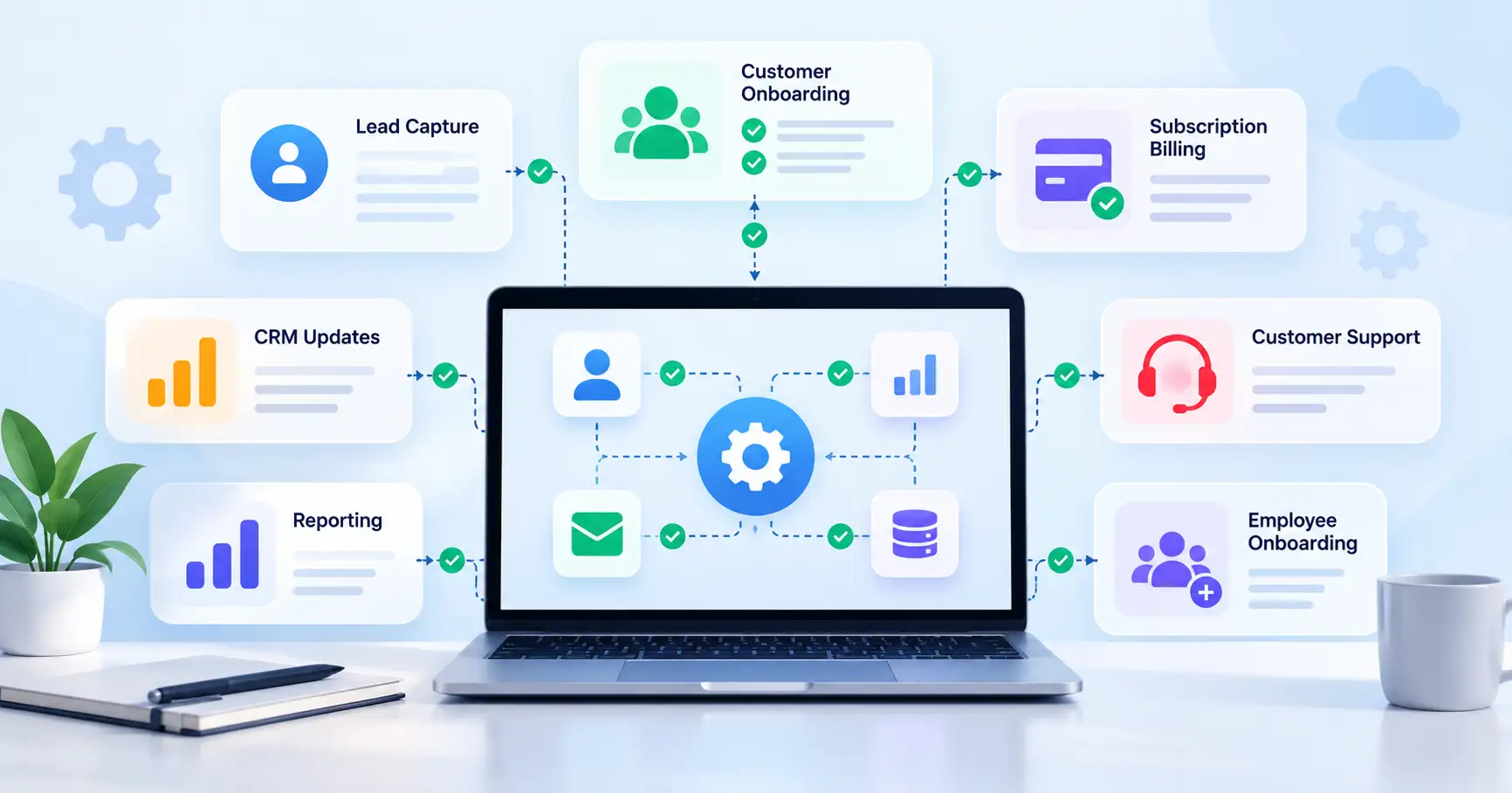
7 SaaS Business Processes Worth Automating
1. Lead Capture and CRM Updates
Sales and marketing teams collect leads through website forms, advertising campaigns, webinars, and other channels. When employees transfer these details into a CRM manually, follow ups can be delayed and data entry errors become more likely.
A workflow automation tool can create new contacts, assign sales representatives, and notify the team when a qualified lead arrives.
Example: When someone requests a product demo, the workflow creates a CRM record, checks the prospect’s region, assigns an owner, and schedules a follow up task.
Keep the initial routing rules simple. Incomplete records and high value opportunities that need additional qualification should still be reviewed by a person.
2. Customer Onboarding and Account Provisioning
A new customer may need a welcome email, account access, setup instructions, and an introduction to the customer success team. Coordinating these steps manually becomes harder as customer numbers grow.
Automation can initiate onboarding tasks when a subscription becomes active or a customer completes a required action.
For example, a new subscriber could receive a welcome email and setup checklist while an internal onboarding task is assigned automatically. More advanced account provisioning may require connections to identity management or product administration systems.
Track onboarding completion time, setup errors, and how long customers take to reach their first meaningful outcome. These measures help determine whether the workflow is actually improving the experience.
3. Subscription Billing and Failed Payments
Recurring billing involves more than collecting subscription payments. Teams also need to manage invoices, subscription changes, payment notifications, and follow ups when transactions fail.
Billing software can handle many of these routine activities. Disputes, unusual adjustments, and sensitive financial decisions may still need approval.
For more detailed implementation guidance, see SaaSyntic’s guide to automating recurring billing and failed payments.
4. Customer Support Ticket Routing
Support teams can use automation to assign tickets based on categories, keywords, customer plans, or urgency.
For instance, a ticket reporting a service outage could go directly to technical support, while a billing question is routed to the appropriate finance support queue.
The important part is getting the rules right. Define escalation paths and monitor incorrectly assigned tickets. Automation should help customers reach the right person sooner, not create another obstacle.
5. CRM Updates and Team Handoffs
When sales, customer success, and finance work across different applications, customer information can become inconsistent. Employees may end up updating the same details in several places.
Workflow automation can synchronize selected records and notify the next team when a deal closes, a subscription changes, or an onboarding milestone is reached.
Before connecting systems, decide which application owns each data field. This reduces the risk of conflicting updates and duplicate records. SaaSyntic’s guide to SaaS APIs versus integrations explains the different approaches businesses can use to connect their applications.
6. Reporting and KPI Updates
Preparing recurring reports often means gathering information from analytics platforms, CRM systems, billing software, and spreadsheets. This work can consume valuable time, especially when the same process needs to be repeated every week or month.
Automating data collection and report delivery makes it easier to review performance consistently.
Still, automation cannot compensate for unreliable data. Define metrics clearly, validate calculations, and investigate missing or unusual values before sharing reports with stakeholders.
7. Employee Onboarding and Access Management
Bringing a new employee onboard involves creating accounts, assigning permissions, sharing documentation, and notifying relevant departments. Offboarding requires similar coordination, particularly when system access needs to be removed.
Automation can create IT tasks when someone joins, route access requests for approval, and initiate access removal checklists when employment ends.
Security controls should remain in place throughout the process. Routine administrative tasks can run automatically, but sensitive access changes must follow the organization’s security policies.
Which SaaS Automation Tools Should You Choose?
The best option depends on your current software stack, workflow complexity, technical resources, and budget. You don’t necessarily need another platform to automate a process you can already handle with your existing tools.
| Tool or approach | Best suited for | What to consider |
| Native integrations | Straightforward workflows between existing applications | Capabilities depend on the applications involved |
| Zapier | Connecting common business apps through relatively simple workflows | Review task limits and recurring costs |
| Make | Visual workflows with multiple steps and conditional logic | Complex scenarios need careful testing |
| Custom API integrations | Specialized or business critical processes | Development and ongoing maintenance require resources |
Zapier and Make are examples of workflow automation platforms. Make describes its service as a visual way to connect applications, transfer data, and build workflows using conditional logic in its business process automation overview.
Start by checking what your existing software can already do. A native integration may be enough for a simple task, while a dedicated workflow platform can connect several applications and coordinate more complicated processes.
Custom APIs may offer greater control for specialized workflows, but the decision should account for development, monitoring, security, and maintenance not just the initial build.
How to Prioritize Automation by Cost and Impact
A useful way to evaluate SaaS workflow automation is to compare its potential benefits with implementation effort, ongoing costs, and operational risk.
Consider a hypothetical team that spends 10 hours each week updating customer records and routing requests manually. Suppose automation reduces the remaining work to two hours of oversight per week.
That would save eight hours a week, or approximately 416 hours over 52 weeks if the workload and savings remain consistent.
However, saved time alone doesn’t prove that the project is profitable. Software subscriptions, implementation, maintenance, and exception handling all affect the final return.
Use this process to evaluate a potential project:
- Document the existing workflow. Record the steps involved, who owns them, how long they take, and where errors occur.
- Estimate the potential benefits. Consider time saved, less rework, faster customer responses, and fewer missed handoffs.
- Calculate the full cost. Include implementation, licenses, maintenance, and training.
- Run a pilot. Test the workflow on a limited scale before rolling it out more widely.
- Compare the results. Measure performance against the baseline you established before implementation.
Prioritize automations that solve meaningful problems without introducing more complexity than they’re worth.
What Should You Avoid Automating?
Automation isn’t automatically beneficial just because a tool makes it possible. Some workflows are better handled manually, at least until the process becomes more predictable.
Be cautious about automating processes that:
- Change frequently or lack clear ownership.
- Involve more exceptions than standard cases.
- Require judgment, context, or sensitive customer communication.
- Could create serious financial or security problems if something goes wrong.
- Cost more to maintain than the benefits they deliver.
For example, automatically sending routine payment reminders is usually easier to manage than automatically approving every unusual refund without checking the transaction history or applicable policy.
Fix the process before automating it. Otherwise, you may simply make existing problems happen faster, with additional effort required to diagnose and correct them.
How to Implement Your First SaaS Automation
Once you’ve identified a suitable workflow, follow a structured approach to implementation.
Step 1: Choose one bottleneck. Pick a frequent task that creates measurable delays, unnecessary manual work, or recurring errors.
Step 2: Map the workflow. Define the trigger, conditions, actions, expected outcome, and possible exceptions.
Step 3: Assign an owner. Decide who will maintain the automation, monitor failures, and approve changes.
Step 4: Test edge cases. Check how the workflow handles missing information, duplicate records, failed connections, and unexpected inputs.
Step 5: Monitor performance. Track time saved, error rates, manual interventions, and customer impact.
Atlassian’s automation documentation also describes workflow logic in terms of triggers, conditions, and actions.
Once the first automation is working reliably, review what you’ve learned before moving to the next workflow. This makes it easier to build on successful processes without repeating avoidable mistakes.
FAQ’s
What should a SaaS startup automate first?
Start with predictable, recurring tasks such as lead routing, onboarding notifications, CRM updates, and routine reporting. Choose the workflow with a clear business benefit and manageable implementation risk.
Are SaaS automation tools worth the cost?
They can be worthwhile when the time saved, reduction in errors, or improvement in customer experience justifies the total cost. Measure actual results, including maintenance and exception handling, rather than relying on estimated savings alone.
Is native automation better than Zapier or Make?
It depends on what you need to accomplish. Native integrations often work well for straightforward tasks within your existing software stack. Zapier or Make may be more suitable when a workflow spans multiple applications or needs flexible conditional logic.
How do you measure automation ROI?
Compare the value of time saved and other measurable improvements against setup, subscription, maintenance, and exception handling costs. Establish a baseline before implementation and review performance after launch.
Conclusion
The most useful SaaS operations tools aren’t necessarily the ones that automate the most tasks. They’re the ones that remove recurring bottlenecks, connect essential systems, and reduce the time teams spend coordinating routine work.
Start with one clearly defined workflow, measure its impact, and put safeguards in place before expanding. Focus on business value rather than the number of automated tasks, and retain human oversight wherever judgment, security, or customer trust is involved.
With a thoughtful approach, SaaS teams can improve operational efficiency without adding unnecessary software or complexity.